Convention
아키텍처
이 가이드에서 '아키텍처'는 프로젝트 요구사항과 팀이 성장함에 따라 확장할 수 있도록 앱을 구조화하고, 조직화하고, 설계하는 방법을 의미합니다.
컨벤션
레이어 구조
프로젝트는 DATA Layer와 UI Layer로 분리됩니다.
DATA Layer
도메인(백엔드 API 기반)별로 구조화
src/data/domain/user/
└── api/
    └── get-me/
        ├── index.ts          # API 함수 (handleApi 사용)
        ├── schema.ts         # Zod Schema, 데이터 검증
        └── fixtures.ts       # Mock 데이터 (스토리북, playwright)
특징:
- 백엔드 API 계약에 의존하는 순수 API 호출 로직만 포함
- React Query 및 클라이언트 로직 제외 (DATA Layer는 독립적)
- Fixtures는 정상/빈 리스트/에러 케이스를 모두 포함하여 테스트 커버리지 확보
UI Layer
사용자 인터페이스 및 클라이언트 로직
구조
src/views/{view-name}/
├── index.tsx                    # 뷰 컴포넌트
├── index.stories.tsx           # Storybook 파일
├── components/                 # 뷰 전용 컴포넌트
│   └── {component-name}.tsx
└── use-{view-name}.ts        # 비즈니스 로직 (선택사항)
특징
- 라우터와 뷰 분리 (
src/app/vssrc/views/): 테스트 용이성과 관심사 분리 - 플랫한 뷰 구조: 각 뷰를 독립 디렉토리로 관리하여 스토리북 관리 용이
- 컴포넌트와 로직 분리: 뷰는 렌더링만, 비즈니스 로직은 커스텀 훅으로 처리
Hook 구분
- Domain Hook (
src/data/domain/{domain}/hooks/): React Query로 서버 상태 관리- DATA Layer API와 매핑, 캐싱, 에러 처리
- 예:
useCurrentUser,useNotifications,useApplyOverview
- UI Hook (
src/views/{view}/use-{view-name}.ts): 비즈니스 로직 처리- 여러 Domain Hook 조합, 내비게이션, 상태 관리
- 예:
useSignInViewModel,useApplyConfirm,useNotificationSetting
Layer 간 데이터 흐름:
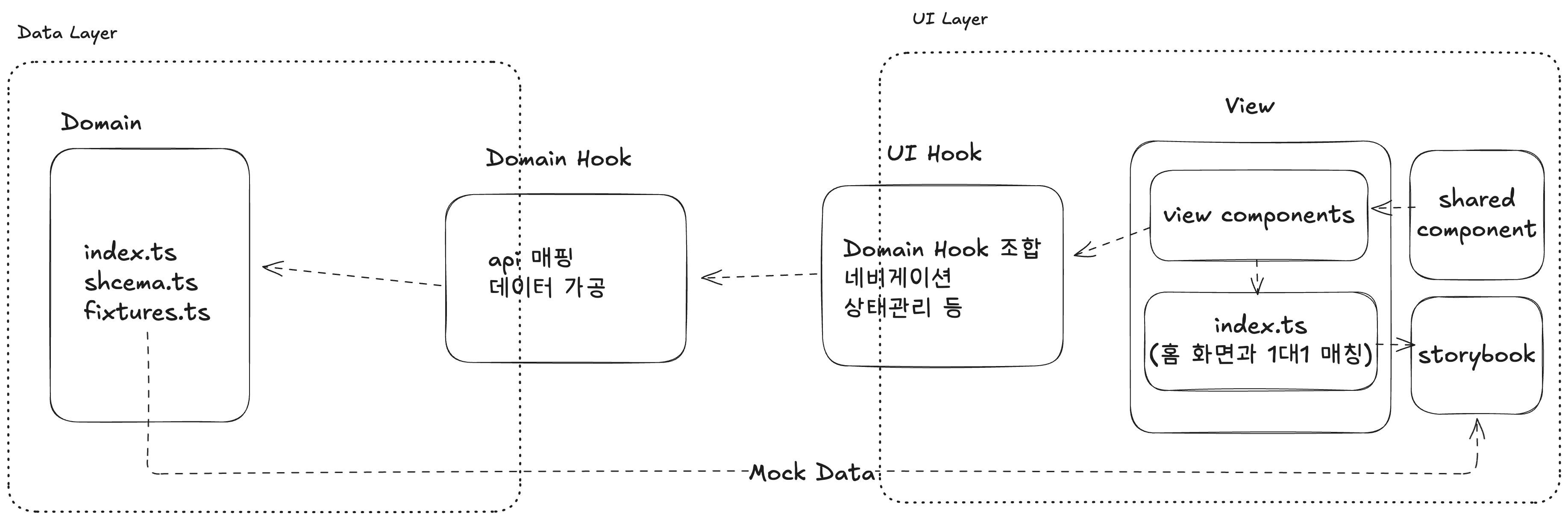
컴포넌트 계층
- Shared Components (
src/shared/components/): 프로젝트 전반에서 재사용되는 범용 컴포넌트- Button, Input, Text, Container, Modal 등
- View Components (
src/views/{view}/components/): 특정 뷰에서만 사용되는 컴포넌트- 각 뷰의 고유한 UI 요소들
스토어 (Zustand)
- 전역 상태 관리는
src/stores/에서 관리 - 세션, 임시 폼 데이터, UI 상태 등 클라이언트 상태 관리
- 서버 상태 관리는 React Query로 관리 (DATA Layer - Domain Hook)
실제 코드 예시
DATA Layer 예시
// src/data/domain/user/api/get-me/schema.ts
import { z } from 'zod'

export const getMeResponseSchema = z.object({
  id: z.number(),
  name: z.string(),
  email: z.string(),
  company: z.object({
    id: z.number(),
    name: z.string(),
  }).nullish(),
})

export type GetMeResponse = z.infer<typeof getMeResponseSchema>
// src/data/domain/user/api/get-me/index.ts
import { API_ENDPOINT } from '@/data/constants/api-endpoint'
import { handleApi } from '@/data/utils/handle-api'
import { getMeResponseSchema } from './schema'
export const getMe = async () => {
return handleApi({
requestConfig: {
endpoint: API_ENDPOINT.USER.ME,
},
responseConfig: {
dataSchema: getMeResponseSchema,
errorCode: ['USER_NOT_FOUND'] as const,
},
})
}DATA Layer 예시 - Domain Hook
// src/data/domain/user/hooks/use-current-user.ts
export const useCurrentUser = () => {
  const { session } = useSessionStore()
  const { data, isLoading, error, isError, refetch } = useQuery({
    queryKey: QUERY_KEY.USER.ME,
    queryFn: async () => {
      const response = await getMe()
      if (response.result === 'ERROR') {
        if (response.data.code === 공통에러_코드.AUTH_REQUIRED) {
          throw new AuthorizationError()
        }
        throw new RequestFailedError()
      }
      return response.data
    },
    throwOnError: true,
    staleTime: 5 * 60 * 1000,
  })

  const status: 'authenticated' | 'unauthenticated' | 'loading' | undefined = useMemo(() => {
    if (session === null) return 'unauthenticated'
    if (isLoading) return 'loading'
    if (error) return 'unauthenticated'
    if (data) return 'authenticated'
    return 'unauthenticated'
  }, [isLoading, error, data, session])

  return { data, isLoading, error, isError, status, refetch }
}참고: Domain hook은 데이터 레이어에 속하고 api와 맵핑되어 UI layer에서 사용하기 편하도록 데이터를 변환하는 역할을 맡습니다.
UI Layer 예시 - UI Hook
// src/views/home/components/status-info/use-status-info.ts
export const useStatusInfo = () => {
  const { data: user } = useCurrentUser()
  const { data: eligibilityInfo } = useApplyOverview()

  const status = useMemo(() => {
    if (!user || !eligibilityInfo) return '로딩'
    if (eligibilityInfo.repaymentInProgressAmount) return '납부중'
    return '이용가능'
  }, [user, eligibilityInfo])

  return { user, eligibilityInfo, status }
}
// src/views/home/components/status-info/index.tsx
export const StatusInfo = () => {
const { status, eligibilityInfo, error } = useStatusInfo()
if (status === '에러') {
throw error
}
if (status === '로딩') {
return <Skeleton width="100%" height={130} borderRadius="xl" />
}
if (status === '납부중') {
return <RepayProgressStatus />
}
return null
}// src/views/home/index.tsx
export const HomeScreen = () => {
const { theme } = useTheme()
const { refreshing, onRefresh } = useRefreshQuery()
return (
<Container edges={['top']} paddingBottom={0}>
<HomeHeaderNavigation />
<ScrollView
style={{ flex: 1, marginHorizontal: -20 }}
contentContainerStyle={{ gap: theme.spacing[7], paddingBottom: theme.spacing[10] }}
refreshControl={<RefreshControl refreshing={refreshing} onRefresh={onRefresh} />}>
<Column
gap={7}
backgroundColor="componentAlternative"
style={{
paddingVertical: theme.spacing.container,
paddingHorizontal: theme.spacing.container,
}}>
<ContractStatusBanner />
<StatusInfo />
<PaymentPendingList />
</Column>
<OhwalGuides />
</ScrollView>
</Container>
)
}참고: src/views/home/index.tsx는 실제 화면과 1:1 매핑되는 컴포넌트로 컴포넌트 사이의 간격을 조정합니다.